
If you already list on eBay, the useful part of automation is being able to keep doing that. Take your photos, write the listing and publish it where you normally work. Listalong can then crosslist suitable new stock to Depop using category rules.
You choose what goes automatically, what needs your approval and what should never go to Depop. That distinction matters if your eBay store contains clothing alongside consoles, electronics and other mixed stock.
Choose what goes to Depop.
Automatically crosslist suitable new listings, review the rest yourself and exclude categories that do not belong on Depop.
This guide covers Listalong’s eBay-to-Depop automation. For the individual listing fields and manual process, see how to cross-list an eBay listing to Depop.
Choose automatic posting or approval first
| Workflow | What happens | When to use it |
|---|---|---|
| Always crosslist | New eBay listings in your chosen category go straight to Depop without waiting in New | Consistent, permitted stock with complete source listings |
| Approval-based selection | You review and choose the items you want to crosslist | Mixed stock, unfamiliar categories or your first batch |
| Never crosslist | New eBay listings in the chosen category are skipped and not offered to Depop | Categories you want to exclude, including prohibited stock |
Automatic posting means you are choosing the category in advance rather than approving every matching new item. If you want to inspect each listing first, leave that category out of Always crosslist and use manual selection.
Step 1 Connect your eBay and Depop accounts
Create a Listalong account and follow the connection steps for both marketplaces. Your original listings stay where they are; connecting accounts alone does not publish them to the other marketplace.
Before enabling automatic posting, check a small group through the manual workflow. Review the available photos, description, brand, size, condition, price and postage. Listalong reuses supported listing information, but destination-specific requirements still need attention when information is missing.
Use this first batch to confirm that the result is something you would be happy for a Depop buyer to see. If the source listing has unclear sizing or missing flaws, correct it before automating more of the same stock.
Step 2 Open Automation and choose Always crosslist
In Listalong’s Automation section, find Automatic rules and select Always crosslist.
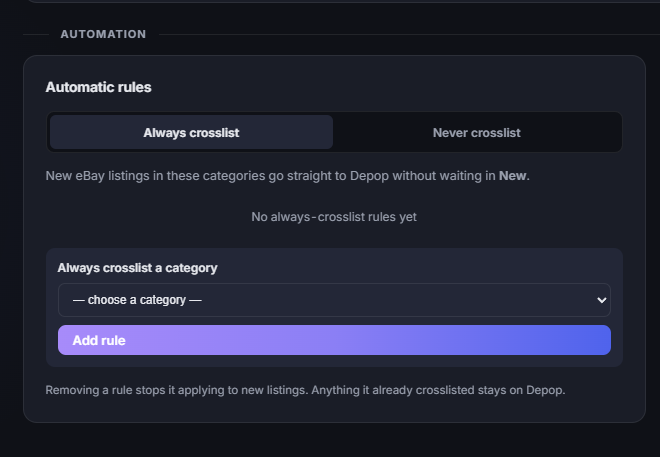
The rule shown here is for new listings. Do not assume adding it will backfill every older listing in your eBay store. Use the existing-listing selection workflow for older stock you want to crosslist.
Step 3 Choose a category and add the rule
Open Always crosslist a category, select the category you want and click Add rule. Confirm that the saved rule appears before relying on it.
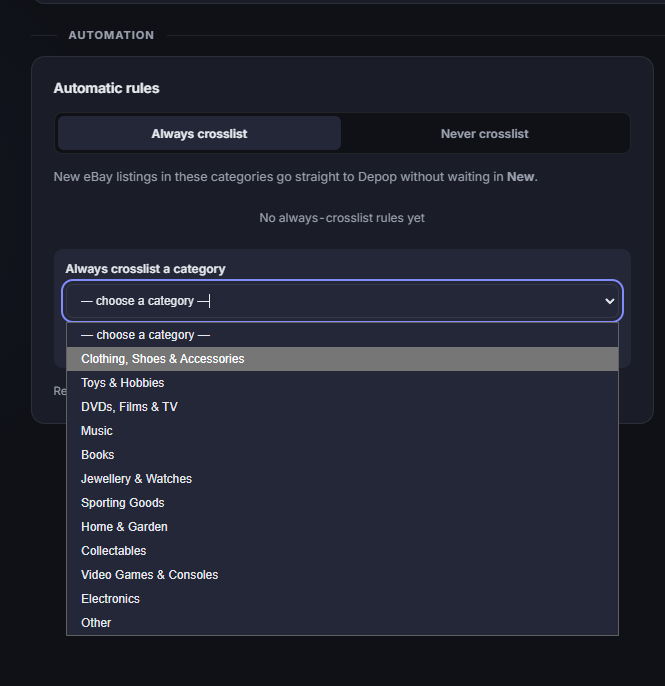
I would start with a category whose stock I know well. If all your clothing listings have clear photos, accurate condition notes and suitable postage, that is easier to assess than a mixed category containing unrelated products.
However, a category rule is broad. Clothing, Shoes & Accessories is not a guarantee that every item within it complies with Depop’s rules. If your stock in a category needs case-by-case checks, keep it on approval-based posting.
Step 4 Exclude consoles and prohibited electronics
Select Never crosslist, choose a category under Never crosslist a category and add the rule. The panel states that matching new eBay listings are skipped automatically and never offered to Depop.
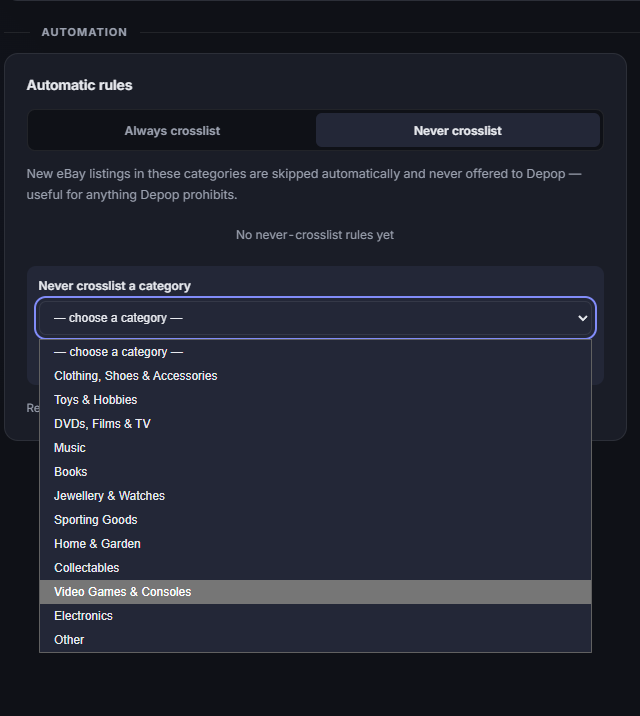
Do not crosslist games consoles, controllers or prohibited electronics to Depop. Its current policy bans most technology products, including phones, headphones, computers, smartwatches, chargers and electronic toys. Seeing another seller list one does not make it permitted. Depop Technology and Electronics Policy.
For a mixed eBay store, Video Games & Consoles and Electronics are sensible categories to consider excluding. This is a broad workflow choice, not a claim that every product in those categories is banned. Depop allows specific exceptions such as cameras, certain camera accessories, phone cases and ordinary digital or analogue wristwatches. Check the policy for the actual item before deciding where it belongs.
An exclusion can therefore skip some permitted stock too. If you sell those exceptions, review how you want to handle them separately. Do not enable an entire mixed electronics category just to allow a few exceptions, or miscategorise an item to get it through.
Step 5 Keep listing on eBay and check the first results
Once the rules are saved, continue creating your eBay listings as usual. A suitable new listing in an Always crosslist category should follow the automatic route; an excluded category should be skipped.
For the first few items, check the result in Listalong and open the destination listing on Depop. Confirm:
- The correct physical item and photographs appear.
- Size, brand, condition and flaw disclosures remain accurate.
- Price and postage are appropriate for the destination marketplace.
- The corresponding eBay and Depop listings are linked correctly.
If an item needs attention or has not appeared, check the connections, rule category and missing-field information rather than repeatedly creating another listing. A saved rule and a successfully published item are different things.
The screenshots above show the real rule controls, not a completed automatic publishing run. They demonstrate how to set up the workflow; verify the first live results in your own store before expanding it.
What happens when an item sells?
Listalong’s linked sold-item sync is designed to end the matching listing on the other marketplace when an item sells. It normally happens within minutes, which reduces the window for double-selling; it is not a promise of instantaneous updates.
Keep an eye on connection problems or items needing attention, especially after changing account access. If you notice a sold item still available on the other marketplace, resolve it promptly.
The how Listalong works page explains the full process from connecting accounts through crosslisting and sold-item handling.
Changing a rule does not undo earlier crosslisting
The Always crosslist panel makes this explicit: removing a rule stops it applying to new listings, while anything already crosslisted stays on Depop.
If you change your mind about a category, review the existing Depop listings separately. Do not treat removing a rule as a bulk deletion or assume that a new exclusion cleans up earlier posts.
Start with the workflow you are comfortable using
Approval first is a useful way to learn what your listings look like on Depop. Automatic rules become useful once you trust the source information and understand the category you are allowing.
You can keep creating listings on eBay throughout. The aim is to reduce repeated work while keeping control over which stock reaches your Depop shop.
Keep your eBay workflow.
Connect eBay and Depop, check a small batch and choose which new listings to crosslist automatically. The 14-day free trial starts when both marketplaces are connected. No card required.
Create your Listalong account Standard A$19/month or Large Store A$39/month after the trial. Compare current plans and inventory allowances.Screenshots supplied from Listalong and Depop electronics policy checked 25 September 2026. Product controls and marketplace policies may change.