
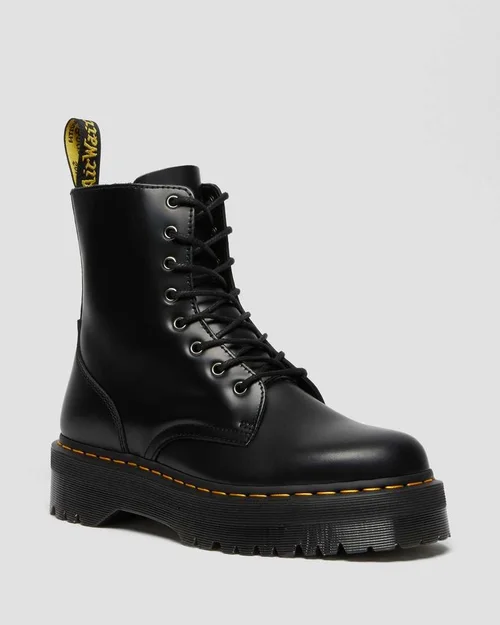
For one item, start in the eBay app. You can photograph it, choose the price and postage, and publish from the account you already use. For a pile of fixed-price items, Listalong Snap is worth trying if you’d like to finish taking photos before you sit down to review drafts. We make Snap, and selling a single item at auction is one case where we’d go straight to eBay.
Snap is available on iPhone and Android and can connect to your existing eligible eBay seller account. Eligible accounts receive 300 welcome credits, once per eBay seller account; these are credits, not 300 listings. No Listalong crosslisting subscription is required (Snap vs crosslisting explained). Download Snap for iPhone or Android.
One pair of boots in the eBay app
Open Selling, choose List an item and photograph the boots. Get the size stamp, soles and both heels in the frame across your photos. A buyer looking at a pair marked “8” needs to know which sizing system that refers to. If the stamp doesn’t say, check the manufacturer’s markings before choosing a size in the form. Select your price or auction format, then enter postage using the weight of the boots in their box. eBay’s mobile listing instructions and Australian guide to listing an item.
Your account may also offer photo-based suggestions. On 28 October 2026, eBay reported expanding the latest version of Magical Listing to new and reactivated Australian sellers. Open a draft in your account to see which fields it offers to fill. On the boots, check the suggested size against the stamp and the condition against the wear on the heels. eBay’s Australian rollout announcement.
Six pairs photographed in one sitting
Put yourself at the same bench with six pairs from an op shop. Two pairs look alike, one has replacement insoles, and one needs cleaning before it can go live. This is where the order of work in Snap can help.
- Photograph the first pair, including the size and tread. Add a note about the replacement insoles while you have them in your hand.
- Tap Next item before photographing the second pair. With generation enabled, Snap can prepare the first draft while you photograph the next. Keep Snap open until the uploads finish.
- Review one pair at a time. Check the photos, the suggested title, the condition and the asking price. Save the dirty pair for later. You can publish the ready pairs to your connected eBay account.
Snap supports eligible fixed-price, single-item listings. For one auction or a listing where a buyer chooses between sizes, use eBay’s own listing tools. Six used pairs with different wear generally warrant six individual listings so each buyer sees the pair they’ll receive. Snap’s supported listing formats and eBay’s advanced listing tool.
Check Australian details before choosing an app
For the boots, compare the exact size markings and visible wear before accepting a draft. Check that the asking price is in AUD, the item location matches your stock, and the postage settings suit the packed pair. Neither app can decide whether an unmarked “8” is UK, US or Australian sizing from the number alone.
Selling from the United States instead? Use our US Android app comparison for a thrift-haul example with US marketplace, ZIP code and shipping checks. Our iPhone setup guide for US and Australian sellers covers both regions without changing this article’s Australian eBay guidance.
Is a separate listing app worth paying for?
Snap is most useful when keeping photos and notes together reduces the work between capture and review. Compare the completed drafts and credit cost with your usual eBay workflow.
Cleaning, weighing and packing still need your attention. For help with the drafting step, download Snap on the App Store or Google Play.
For setup on Apple devices, see the iPhone listing app guide. To compare ongoing costs, use the pay-as-you-go credit calculation.