
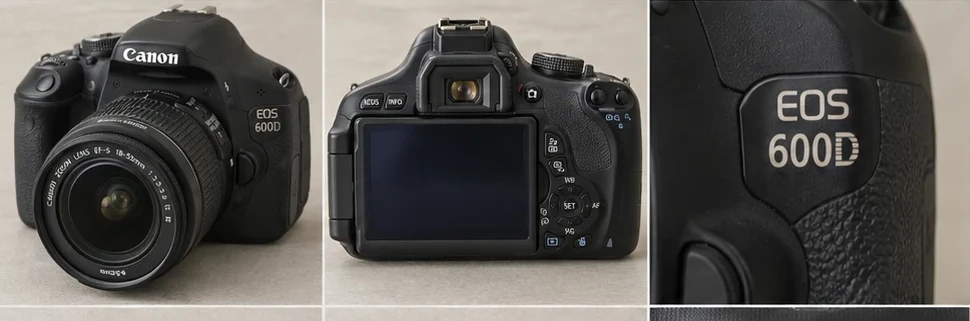
Start a used camera listing by laying out everything the buyer will receive. Read the model from the body, then read the markings around the lens separately. Two listings for a Canon EOS 600D can describe different purchases if one is a body alone and the other includes a lens, battery and charger.
Record the body, lens and accessories
Photograph the front and rear of the camera, the screen, the battery compartment and a legible model marking. For an interchangeable lens, take an angled photo of the lettering around its front rim. Copy the focal length and other identifying details you can read. For a compact camera with a built-in lens, describe it as one camera.
Set aside any cable, card or battery borrowed for testing. Decide which accessories are part of the sale before taking the group photo. A group photo of just the included kit doubles as a packing checklist when the camera sells.
Write down the test you actually ran
Use a compatible battery and an empty card you own. Keep the file from a test shot until you’ve finished the listing.
| Check | What to record |
|---|---|
| Startup | Whether the camera stays on, any displayed error, and whether a compact camera’s lens extends and retracts. |
| Capture and playback | Photograph printed text in good light, play it back and open the saved file on another device. On a zoom camera, repeat at both ends of the zoom range. |
| Flash and controls | Try a shot with flash enabled, then check the buttons and dials you intend to describe as working. |
| Battery and accessories | Identify the battery and card used for the test and whether either is included. A brief test tells you little about how long an older battery holds charge. |
If it powers on but won’t save a photo, describe the point of failure and the message on screen. For example, “Lens extends and the menu opens. With my test card inserted, pressing the shutter showed ‘card error’. No image saved. Cause unknown.” Use the message you actually saw.
If you have no matching battery, give the model, included parts and visible condition. For example, “Body and lens only. I had no compatible battery, so power, shutter and image capture are untested. Battery, charger and card excluded.” Choose an available category condition you can support. Guide to untested and for-parts listings.
Match the title, condition and asking price to the kit
If the body says EOS 600D and the included lens says 18–55 mm, a clear title is “Canon EOS 600D DSLR camera with 18–55 mm lens”. Add condition and accessory details in the description. When reviewing sold listings, separate body-only sales from kits, and compare similar test results. A tested kit with a charger is a poor price reference for a body you couldn’t power on.
Check any model and lens fields against your own photos. eBay uses category-specific details to help buyers filter listings, and a catalogue suggestion may describe a different kit. eBay Australia’s guide to item specifics
Use the photos to prepare the draft
Open the camera example in Listalong Snap’s batch preview to see how the body photos, lens detail and testing note fit together. Photograph your own kit in Snap, add the test results and review the draft before posting. Read the included-accessories line once more while the kit is in front of you.
Get Listalong Snap on the App Store or Google Play.