
If I had space for one selling app on an Android phone, I’d keep eBay. It gets you from a photo to a live listing and gives you somewhere to check what comparable items sold for. The case for a second app depends on where you lose time. Google Lens helps when you can’t put a name to something. Listalong Snap helps when you know what you have, but there are five items on the bench and five descriptions still to write. We make Snap.
| What’s on your bench? | App to open | What to check yourself |
|---|---|---|
| A ceramic jug with an unfamiliar maker’s mark | Google Lens in the Google app | Compare the mark, base and dimensions with a credible reference before naming the maker. |
| A game you recognise but haven’t priced | eBay | Find Australian sold copies for the same platform, edition and contents. |
| Five different items for fixed-price listings | Listalong Snap | Check that each draft has the right photos, condition, price and postage. |
| A single item you want to auction | eBay | Choose the auction format and review the starting price and duration. |
Google Lens for the item you can’t identify
Take one photo of the whole jug and a second of the stamp underneath. In the Google app, open Lens and select the stamp photo. Crop to the mark if the results mostly resemble the jug’s shape. A maker’s name in the results gives you a better search to run. Compare lettering and marks on documented examples before putting that name in an eBay title. A retail price or a visually similar piece is a poor basis for valuing a used one. Google’s Android image-search instructions.
The eBay app for a price check or a one-off listing
Suppose the next item is Mario Kart 8 Deluxe. Search the title and platform, select sold items, and compare a loose cartridge with other loose cartridges. A result including a console can look very attractive until you open it. Once you’ve chosen a price, start a listing, photograph your copy, choose the format and review the delivery details. For a single item, this is a short route from research to listing. Australian sold listings walkthrough and eBay’s mobile selling guide.
Before trying a second app, give eBay one boxed game from the pile. In the listing flow, scan the case barcode and check the catalogue match against the cartridge inside. Keep catalogue facts such as the platform if they match. Supply your own photos and details about label wear, missing inserts and how far you tested it. On 28 October 2026, eBay also reported expanding its latest AI listing flow to new and reactivated Australian listers. Check which suggestions your own account offers. If the barcode fills most of what you need, you have a good reason to finish that game in eBay. eBay mobile barcode instructions · eBay’s Australian AI rollout announcement.
Listalong Snap for a batch of five
Snap makes the most sense when the work you put off is writing several different descriptions. You can photograph one item, add a private note and move on to the next while the stock is laid out. Review the resulting drafts together. For an auction, start in eBay. For five identical units, check whether one multi-quantity eBay listing fits before generating five separate drafts.
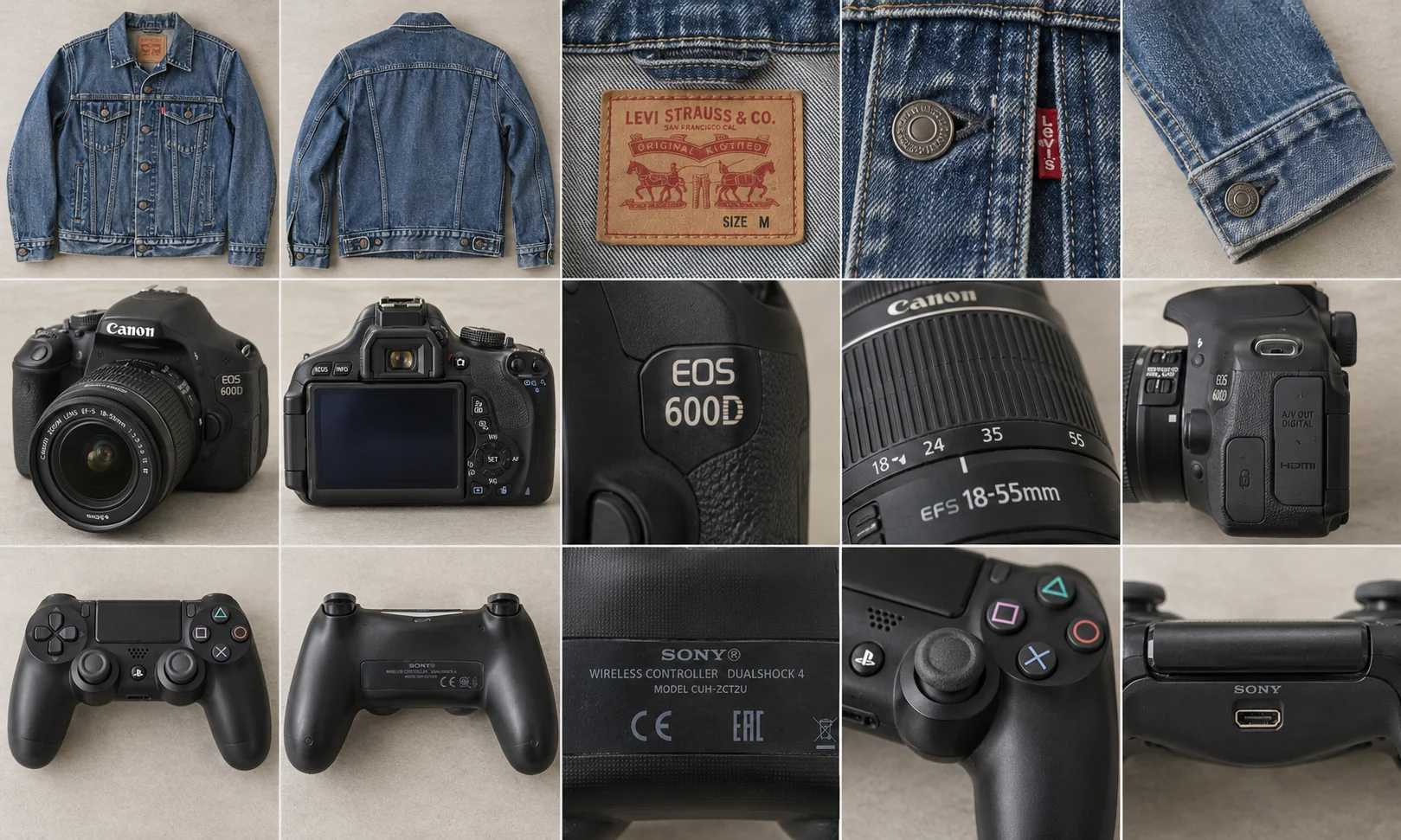
Try the workflow with a medium shirt, a large shirt, a camera, a controller and headphones. The two shirts test whether similar photos stay with the right item. The electronics test whether the draft distinguishes something visible in a photo from something you actually tested.
- Photograph the medium shirt, its label and any wear. Add its measurements. Tap Next item and repeat for the large. Compare both size labels at review.
- For the camera, capture the model plate and included accessories. Add a note about the test you performed and whether the test battery comes with it.
- For the controller, photograph the rear label and record which buttons or sticks you checked. Set it aside if it needs more testing.
- For the headphones, record the model and photograph the pads. Open the draft and read the condition wording beside the photos before choosing a price.
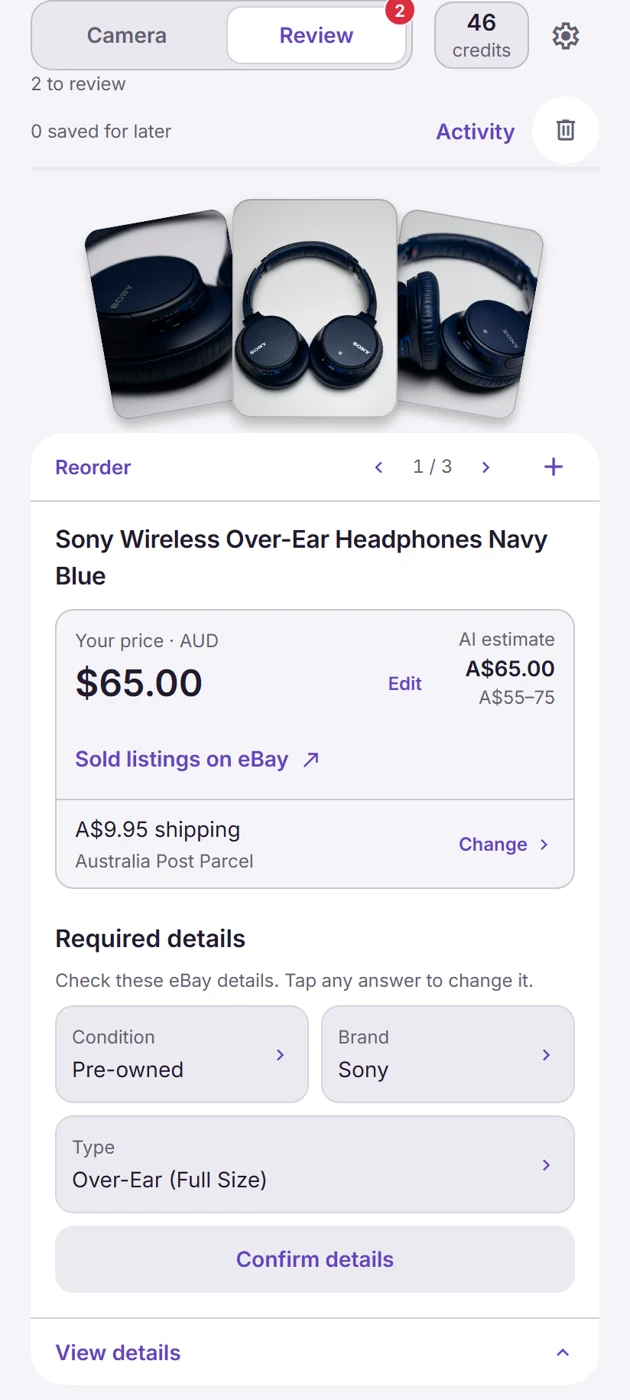
What would you change in this headphone draft?
Look at the screenshot. The title says Sony Wireless Over-Ear Headphones Navy Blue. The price field says A$65 and the AI estimate shows A$55–75. The postage field says A$9.95. Those are three editable decisions. Here’s how I’d check this draft at the bench.
- Find the model. Check the headband, earcups or product label and add a readable close-up. The title on screen gives a buyer no model number to search. If the marking is illegible, leave it out and show the label. Guessing a model can pull in sold comparisons for a more expensive pair.
- Narrow the price search. Tap Sold listings on eBay, enter the verified model and compare used pairs with similar pad wear. Separate headphones sold with their case or cable from bare pairs. A generated price range doesn’t tell you whether those extras were included.
- Write down what worked. For example, if you paired the headphones and heard audio in both ears for five minutes, put that in your note. That check establishes very little about battery endurance. Weigh the packed pair before accepting the postage shown.
If you can finish those checks, the app has saved you the typing while leaving you in control of the claim the buyer will read. If you repeatedly need to take the item back out for another photo, change your photo routine first. A faster description won’t recover that time.
How to compare the cost on your own stock
Use the same saved photos and notes to prepare five drafts in each app. Stop the clock after checking the fifth draft. Record the credits consumed by Snap and the number you could actually publish. If four are ready, divide the batch’s generation cost by four. For example, if the batch cost you A$1 and you value listing time at A$30 an hour, saving two minutes across the batch covers that dollar. Those are example inputs. Use the credit price and balance in your own app. Five-item scorecard for comparing bulk listing tools.
Eligible new eBay seller accounts start with 300 Snap credits. You can work through the three-item example on the Snap page or get Listalong Snap on Google Play.