
If eBay asks for a UPC, first establish exactly which product you have. A UPC identifies a particular retail product. The serial number on your camera identifies your individual unit. Your stock code tells you where you put it. Entering any convenient number may attach the wrong product details to your listing.
Work out which number you are looking at
The usual retail UPC has 12 digits. A common Australian retail barcode is an EAN-13 with 13 digits. Read the whole number printed under the bars and check which field the form offers. GS1 Australia’s barcode guide.
| Marking in front of you | Where it belongs |
|---|---|
| Number beneath the manufacturer’s retail barcode | Compare it with the UPC or EAN field and the exact product. Copy every digit, including a leading zero. |
| Manufacturer’s model or part number | Use the model or MPN field that matches the marking. A lens kit can have a different part number from its camera body. |
| Serial number on one unit | Use it for your own records. It cannot identify every unit of that product. |
| Your own tub code or an op-shop price sticker | Keep your stock code in the custom label/SKU field (how to set up SKUs). The shop sticker may identify only that shop’s stock. |
“Does not apply” has a specific use. eBay documents it as Australian wording for an unavailable identifier. Its item description policy also prohibits using a placeholder when the manufacturer supplied the required identifier. Losing the box does not establish that a code never existed. Available fields depend on the listing category. Read the requirement shown on your own draft. eBay’s identifier guidance · eBay Australia’s item description policy.
Three items, three decisions
A boxed Switch game. Scan the retail barcode and compare the result with the platform, edition and region markings on your case. Open it and read the cartridge too. An eBay Australia retailer’s Mario Kart 8 Deluxe listing actually displays “Does not apply” under UPC. That tells you what one seller entered. If your own case has a legible manufacturer barcode, use the code that belongs to it. See the retailer’s item specifics.
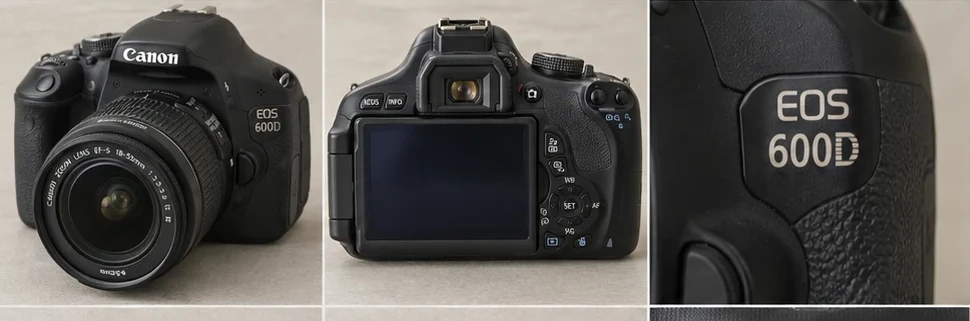
A Canon EOS 600D without its box. Read the model marking on the body. Decide whether you have the body alone or a kit with a particular lens. An Australian seller’s listing for this model specifies a body alone and excludes even the battery. A search for “Canon 600D” can bring up both bodies and kits. Check the exact version against the manufacturer or eBay catalogue. Reject any suggested match that adds a lens the buyer won’t receive. Body-only listing · eBay catalogue instructions.
An unbranded second-hand blouse. Check the neck, side seam and care label before choosing a brand value. A missing neck tag alone proves little. If the item genuinely has no applicable product identifier and the form offers an unavailable option, use it. Complete the required size and condition separately. A seller in Kyogle, NSW, described a blouse with no tag and gave its 66 cm underarm measurement. A buyer can compare that figure with a blouse they own even when the size estimate is uncertain. Untagged blouse example.
If the phone form still blocks the listing
Save the draft and read the exact error. Recheck the category and condition, then enter the verified number manually if scanning failed. A wrong catalogue match can fill the title, model and item specifics together. Review all three after changing it. If eBay requires an identifier you still cannot establish, keep the draft and ask eBay about that category with the error text and model details. A published example from another account cannot confirm what today’s form will accept.
When working from photos in Listalong Snap, add the verified model, kit contents and missing accessories as seller notes. Check the generated specifics before publishing. A clear model photo helps with drafting even when you have no retail box. Get Snap on the App Store or Google Play.