
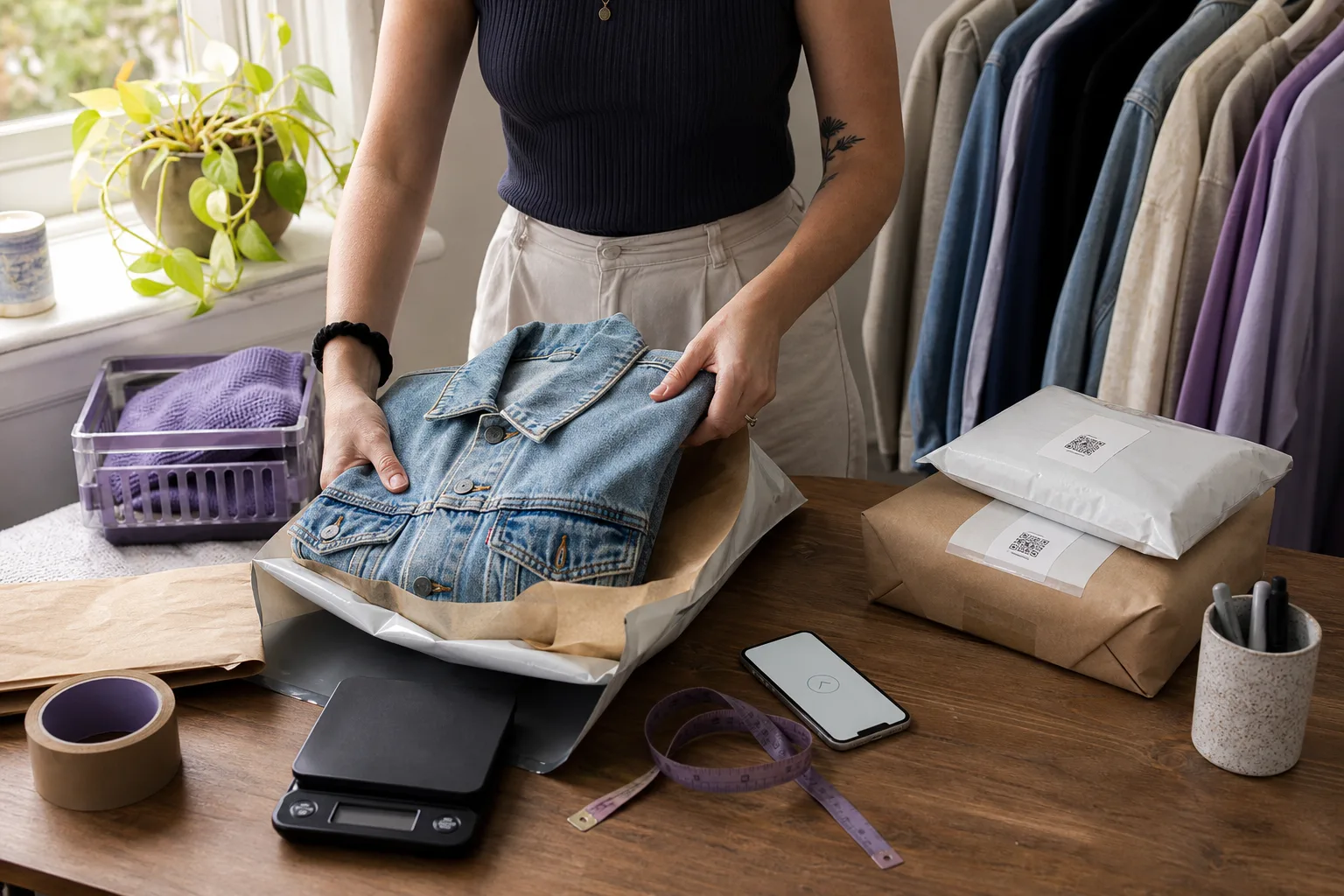
You made a Depop sale. Open the sold order before buying postage. It may already have an Australia Post label or QR code supplied through Depop Shipping.
Australia’s rollout is phased, so your shop can contain both Depop Shipping orders and older manual-shipping orders. This guide covers the supplied-label process first, then explains how to buy and print postage when a manual order requires it.
Looking for the prices? Our Small, Medium and Large Depop shipping price table records A$8.49, A$9.99 and A$12.99 respectively from a connected Australian account check on 4 November 2026. It includes Depop’s suggested items for each tier. Confirm the current quote in Depop before listing or buying.
If a parcel is delayed, missing or arrives damaged, use the Australian Depop parcel checklist to organise tracking, evidence and the correct help process.
If a buyer needs urgent delivery, check our Australian Depop Express shipping investigation before promising a service or replacing a supplied label. It compares the new-listing form with an older manual-postage listing.
First, check which shipping method the sale uses
| What the order shows | What to do |
|---|---|
| Depop Shipping | Use the supplied label or QR code; tracking updates automatically |
| Manual shipping | Arrange tracked postage and add its tracking number to Depop |
Listings created before an account joins the rollout can remain under Other and need manual postage. Check the order’s shipping method and resolve an unexpected missing label with Depop. The Australia Post rollout explainer covers the October 2026 policy dates, phased access and what happens to existing listings.
Use the label supplied by Depop
For a Depop Shipping order:
- Open the label or QR code in the sale email or sold-order screen.
- Pack the correct item securely and check the label’s address and parcel requirements.
- Print and attach the label, or take the QR code to a participating Post Office for printing.
- Lodge the parcel, retain proof of lodgement and check that tracking begins to update.
Use the label for that specific sale. Do not replace it with one bought elsewhere or put another order’s label on the parcel.
The official Australian shipping guide, checked 18 October 2026, distinguishes supplied-label orders from older manual ones. Follow the specific sale’s method, even if another item from the same shop required a different process.
For eligibility under Depop’s seller protection programme, the item must be sent using its Depop Shipping label within five days of the transaction, alongside the other conditions. Printing a label is not dispatch. Lodge the parcel promptly and keep evidence.
Where do I find the Depop label or QR code?
| Device | Where to look |
|---|---|
| iPhone | My Depop → Sold → select the item → Ship your item now |
| Android | Selling Hub → Sold items → select the item → View shipping label |
| Website | Profile picture → Your selling hub → Sold → select the order |
The sale email also contains the label and QR code. Use the QR code at a Post Office that offers label printing. Parcel lockers and street posting boxes require the printed label attached beforehand.
Do I need to mark a Depop-label order as shipped?
No. Depop says tracking and shipment status update through its label. For manual orders, add tracking yourself and check it before saving: Depop says it cannot be amended afterwards.
The steps below cover manual-shipping orders. Skip the MyPost Business purchase steps when Depop has already supplied your label.
Manual shipping with MyPost Business
Only follow these steps when the sold order requires you to arrange postage yourself.
Before you start
Have these ready:
- the item, fully packed
- the parcel’s weight
- the parcel dimensions if you are using your own packaging
- your sender name and return address
- the buyer’s name and delivery address from the Depop receipt
- a MyPost Business account or another tracked-postage service
- a way to print the label, or access to a participating Post Office
Pack the item before entering the weight. A jumper might fit one rate when loose but move into another after the satchel, tissue, cardboard or protective layer is added.
For bulky parcels, the Australia Post cubic-weight calculator can help you check the effect of the box dimensions.
1. Find the delivery address in Depop
On the Depop website:
- Open your profile menu.
- Go to Selling Hub.
- Select Sold.
- Open the order you are packing.
- Check the Shipped to or delivery-address section.
In the app, open your sold items and select the order.
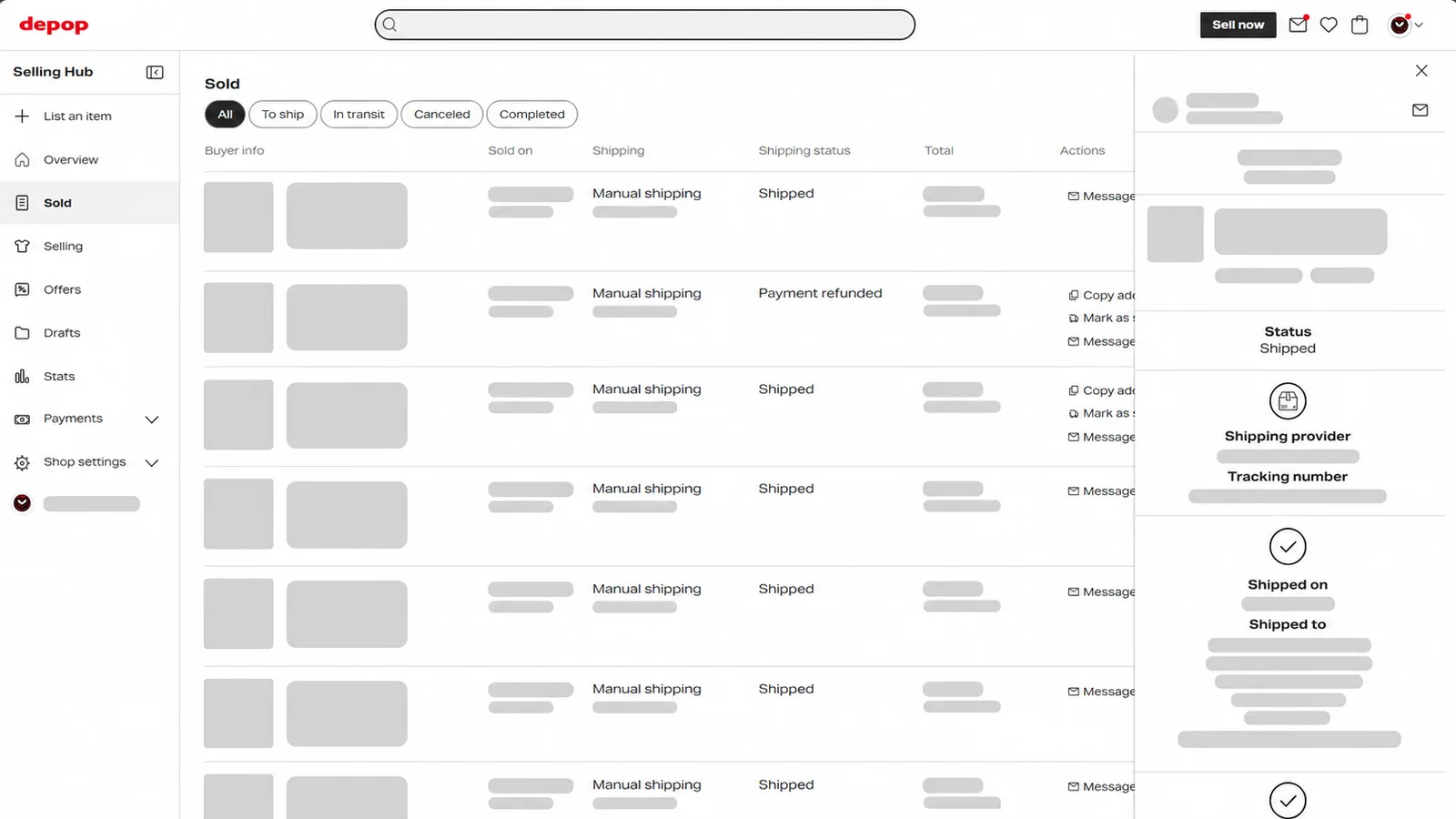
Example only: all buyer, seller and order details have been permanently redacted.
Copy the buyer’s:
- full name
- unit or street address
- suburb
- state
- postcode
- country, if displayed
Use the address recorded on the Depop sale. Do not take an alternative address from a direct message.
If the buyer asks you to change the address
Do not edit the address yourself or write a different address over the label.
Depop’s address-change guidance says to refund the order, ask the buyer to update their address inside Depop and then let them purchase again. This keeps the payment, order and delivery records aligned.
2. Add the Depop order to MyPost Business
Sign in to MyPost Business, then:
- Open the Orders tab.
- Select Add an order.
- Enter your details under Send from.
- Enter the Depop buyer’s details under Deliver to.
- Add the packed parcel’s packaging type, weight and dimensions.
- Choose Parcel Post, Express Post or another suitable tracked service offered for the parcel.
- Add Signature on Delivery or Extra Cover if appropriate for the item’s value.
- Select Save order, then Pay & print.
Australia Post recommends leaving address validation switched on. Check that the suggested address still matches the Depop receipt, especially the unit number and postcode.
The buyer’s phone number and email are not normally mandatory for a standard domestic street address. If you choose to send Australia Post tracking notifications, an email address may be required. Only use contact information supplied for fulfilling that order.
3. Choose the right Australia Post service
The cheapest-looking option is not useful if the parcel does not fit its limits.
Before paying, check:
- the packed weight
- the external parcel dimensions
- whether the item is safe in a satchel or needs a box
- whether tracking is included
- whether the value justifies Extra Cover or Signature on Delivery
- the delivery speed promised to the buyer
A light T-shirt may suit a satchel. Shoes, a structured handbag, fragile accessories or a valuable coat may be safer in a box.
The Australia Post own-packaging versus flat-rate guide explains the trade-offs. You can also compare common options in the Australian reseller postage comparison.
4. Print the label with a normal printer
You do not need a thermal label printer to start shipping Depop orders.
Australia Post’s label-printing guide supports several domestic label formats, including:
- A4, one label per page
- A4, four labels per page when using compatible label sheets
- A6 for a thermal label printer
For an ordinary inkjet or laser printer, choose the A4 one label per page setting in MyPost Business and print on plain white paper.
Use these checks:
- Print in black ink on clean, matte white paper.
- Do not scale the PDF or use a “fit to page” setting that shrinks the barcode.
- Make sure the address and every barcode line are sharp and complete.
- Trim away excess paper without cutting into the label.
Australia Post also offers free A4 label sheets at Post Offices for use with suitable printers. If you ship regularly, self-adhesive sheets or a thermal printer can make the process faster, but neither is required for your first sale.
5. Attach the paper label to the satchel or box
If you printed on plain A4 paper, place the trimmed label in the centre of the flattest surface.
Secure it with strong tape around all four edges so it cannot lift or tear away during sorting.
The important part is what not to do:
- do not place tape over the barcode or printed label area
- do not wrap the label around a corner
- do not place it across a box opening or satchel seam
- do not crease the barcode
- do not leave old labels or barcodes visible
- do not overfill a satchel until the label curves or wrinkles
Australia Post’s own-packaging guidance says labels should remain clear, visible and uncovered by tape. Do not cover the entire label with clear tape: secure the outer edges without covering the address or barcode.
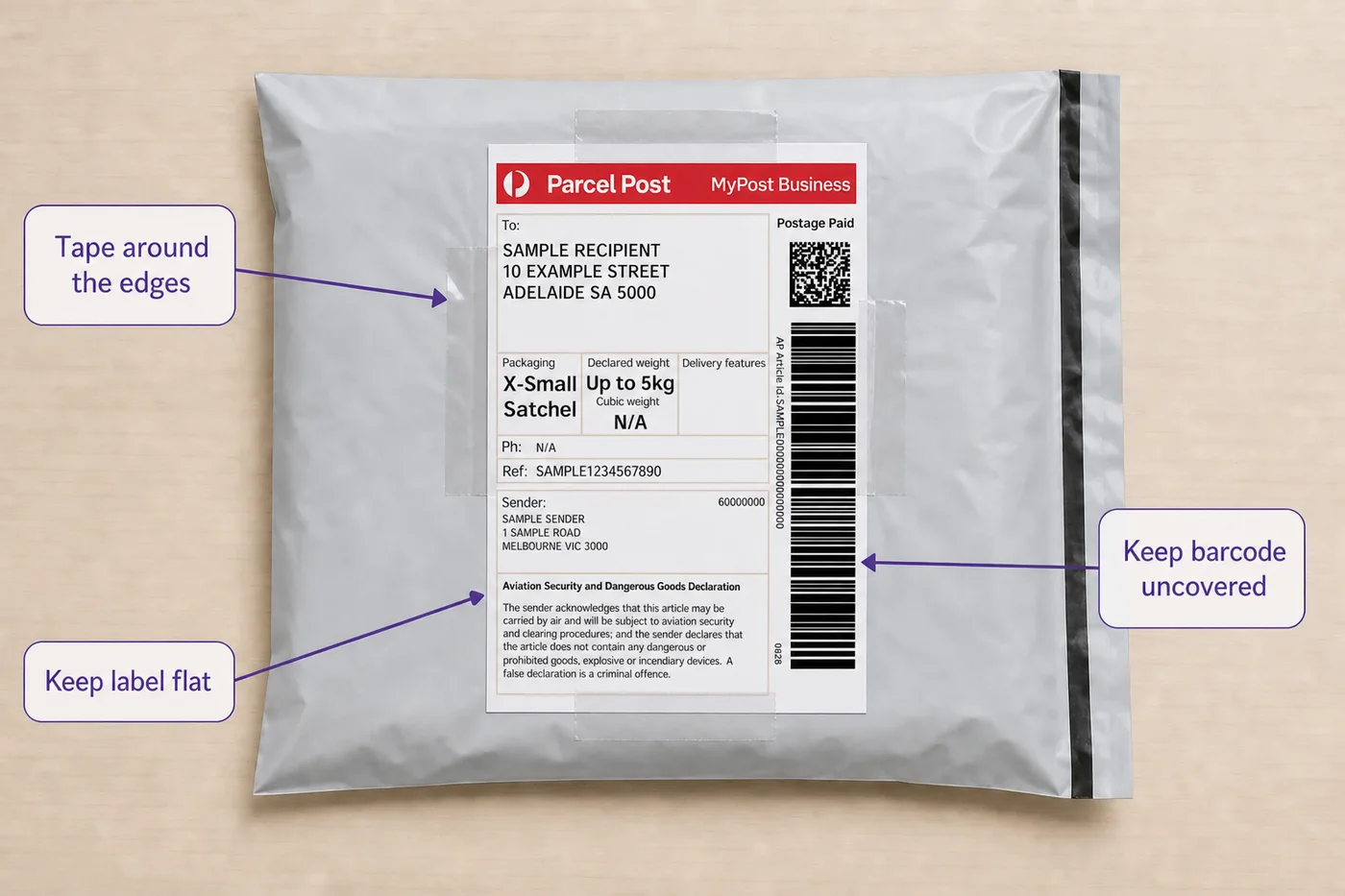
For a recycled box or satchel, remove or completely cover every old address and barcode before attaching the new label.
What if you do not have a printer?
For a manual order, MyPost Business may offer in-store printing for eligible labels. After paying, choose the option to print at a participating Post Office and take the generated QR code with you. For a Depop Shipping order, use the code supplied by Depop instead.
Australia Post’s printing guide says its MyPost Business in-store QR codes expire after four days. That is MyPost Business guidance, not a verified expiry for Depop’s codes; follow the instructions supplied with the relevant label.
You can also take a correctly addressed parcel to a Post Office and purchase postage at the counter. Ask for tracked delivery and keep the receipt.
6. Lodge the parcel and keep proof
Creating a label is not proof that you handed the parcel to Australia Post.
Lodge it at an appropriate Post Office or Australia Post drop-off point and keep the lodgement receipt. Check later that the first tracking scan has appeared.
Depop recommends using tracked shipping and keeping proof until the item has been safely delivered.
For a valuable sale, consider photographing the packed item and attached label before lodgement. Keep any condition photos as well. Avoid storing or sharing the buyer’s address longer than needed to fulfil the order.
7. Add the Australia Post tracking number to Depop
Return to the sold order after the parcel has been lodged.
For a manually shipped order:
- Open the sale receipt.
- Select Mark as shipped.
- Choose Australia Post as the shipping provider when available.
- Enter the tracking number carefully.
- Confirm the shipping update.
Depop’s web Selling Hub displays the shipping provider, tracking number, shipping date and delivery address in the sold-order panel. The buyer can then follow the parcel without repeatedly asking for an update.
Copy the tracking number from the Australia Post label or receipt rather than typing it from memory. Check every digit before saving.
If the order used Depop Shipping, tracking and shipping status are handled through its label. There is no need to manually add tracking or mark that order as shipped. Read the Australian payout guide if you are waiting for payment after delivery.
How much is Depop shipping in Australia?
For Depop Shipping, check the charge and parcel requirements shown in the listing or order. A manual-postage example or MyPost Business quote is not a universal Depop label rate.
The buyer-facing item price can also include a marketplace fee, with postage displayed separately. Our Australian buyer-price explainer shows how those amounts differ from the price you set.
For manual shipping, set the amount before the item sells.
A practical estimate includes:
current postage quote
+ satchel, box and protective materials
+ optional cover or signature
+ any payment-processing effect on the shipping amount
Do not use one guessed shipping price for every item. A T-shirt, denim jacket and pair of boots can all require different packaging and postage.
The eBay and Depop fee calculator lets you include postage, packaging and stock cost when checking your margin.
A simple packing checklist
Before leaving for the Post Office, confirm:
- the correct item is inside
- the item’s condition matches the listing
- the parcel is sealed securely
- the buyer address matches the Depop receipt
- the sender address is correct
- the label is flat and readable
- no tape covers the label or barcode
- no old labels remain visible
- the parcel matches the paid weight and dimensions
- you have kept the tracking reference for manual shipping, or know that the supplied Depop label will update tracking automatically
Shipping several Depop orders
Entering one address at a time is manageable for an occasional seller, but it becomes repetitive when several eBay and Depop orders need to go out together.
Several separate orders are different from one buyer’s bundle. For items bought together, use the Australian Depop bundle guide to check the contents, packed parcel and discount before dispatch.
MyPost Business supports bulk order imports, and Listalong’s shipping workflow helps prepare eligible orders where you arrange your own postage. Match each exported order with the marketplace receipt before purchasing a label.
Exclude orders with a supplied Depop label from a separate postage purchase.
If you are managing both marketplaces, see the combined eBay and Depop label workflow before deciding whether it fits your orders. For a single Depop-label order, follow the supplied label workflow above.
Plan a break from dispatching
Before Christmas, use the 2026 posting-date checklist to plan the orders you can actually dispatch. If you are taking time off, check eBay Time Away and Depop Vacation Mode separately, including the automatic expiry of a Depop pause.
Frequently asked questions
Can I print an Australia Post shipping label with a regular printer?
Yes. Australia Post supports an A4 one-label-per-page setting for plain paper, so a normal inkjet or laser printer can be used. Print at the correct scale with black ink on matte white paper, trim the page and secure the label flat to the parcel.
Do Depop sellers in Australia need tracking?
Use tracked shipping and keep proof of lodgement. Depop tells sellers who arrange their own delivery to add tracking to the sale receipt, and tracking gives both the seller and buyer evidence of the parcel’s progress.
What if the buyer’s Depop address is wrong?
Do not send to a different address supplied in a message. Depop says the seller should refund the order, ask the buyer to correct their address in Depop and have them purchase again.
Sources and methodology
The Australian rollout, supplied-label process, manual tracking, seller protection conditions and Australia Post printing and packaging sources were rechecked on 18 October 2026. The policy dates and phased account rollout are recorded separately; no universal Australian Depop label price or Depop QR-code expiry is assumed. Follow the actual order and confirm its service and charge before posting.
- Depop: how to ship worldwide
- Depop: how to ship in Australia
- Depop: Australian shipping policy and effective dates
- Depop: seller protection conditions
- Depop: correcting an address after purchase
- Depop’s Australian selling and shipping overview
- Australia Post MyPost Business Toolkit
- Australia Post label-printing tips
- Australia Post guidance for using your own packaging